


February 03,2026
Hotel Chatbot? Easy with Domino CRM!
Last time, we took a deep dive into the potential of chatbots for retail stores, both online and regular ones. Today, we’ll take a closer look at what chatbots can do for hotels. This is a very important user segment for us, which is why we created a dedicated template specifically for it.
The hotel business, as well as the hospitality industry more broadly, is known for several characteristics:
- Relatively low margins;
- A fairly long payback period on investments;
- Strong seasonality.
That’s why any solution that helps a hotel optimize processes and reduce operating costs is always a plus. This is exactly why setting up and launching a hotel chatbot is a logical step, whether you run a small bed and breakfast or a large seaside resort.
What a Modern Hotel Chatbot Can Do
At a glance, here’s what a technically advanced hotel chatbot can easily handle:
- Start a conversation in a convenient way using a simple trigger;
- Warmly greet the guest, setting the right tone with a text or voice message;
- Run a virtual tour using image and video blocks;
- Present room categories and prompt the guest to make a choice using reply buttons;
- Accept a booking request with check-in and check-out dates and record it. Domino CRM scenarios include an HTTP Request node that allows the chatbot to integrate with external CRM systems (naturally, including hotel systems) and send collected data to them. In practice, the data is saved as variables inside Domino CRM, inserted into the request body in the required curl format, and then sent to the external system;
- Process payments with a receipt, if payment is required before check-in;
- Send reminders about check-in, check-out, and accommodation conditions;
- Inform guests about promotions, special offers, and seasonal rates;
- Run giveaways and activities for subscribers;
- Accept requests for transfers, SPA services, excursions, and other add-ons that increase hotel profitability;
- Record, store, and reuse all important information;
- Transfer the conversation to the front desk;
- And even use AI during communication with guests.
The 'Hotel' Chatbot Template
To launch a hotel chatbot as quickly as possible, all you need to do is:
- Register in Domino CRM;
- Go to the Automation section;
- Click + New Flow;
- Select the Hotel template. It appears first in the list.
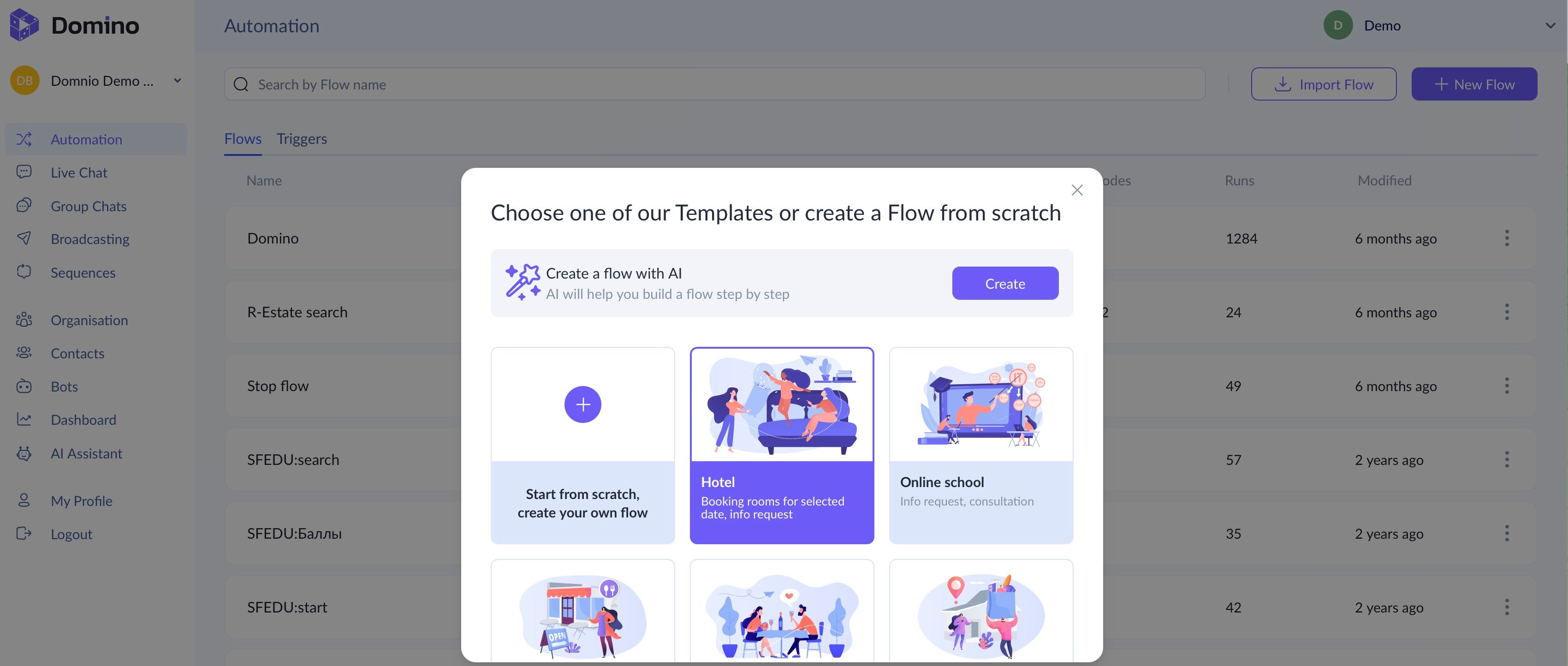
Domino CRM offers all this. And even more! We’ve packed some functionality into our ‘Hotel’ template.
What the Hotel Chatbot Template Does
Our hotel chatbot template:
- Greets the guest and then either introduces the hotel’s room categories or guides them directly to booking;
- Records check-in and check-out dates, which are neatly stored in the system;
- Confirms the booking;
- Suggests booking additional services;
- Allows the guest to contact a human staff member.
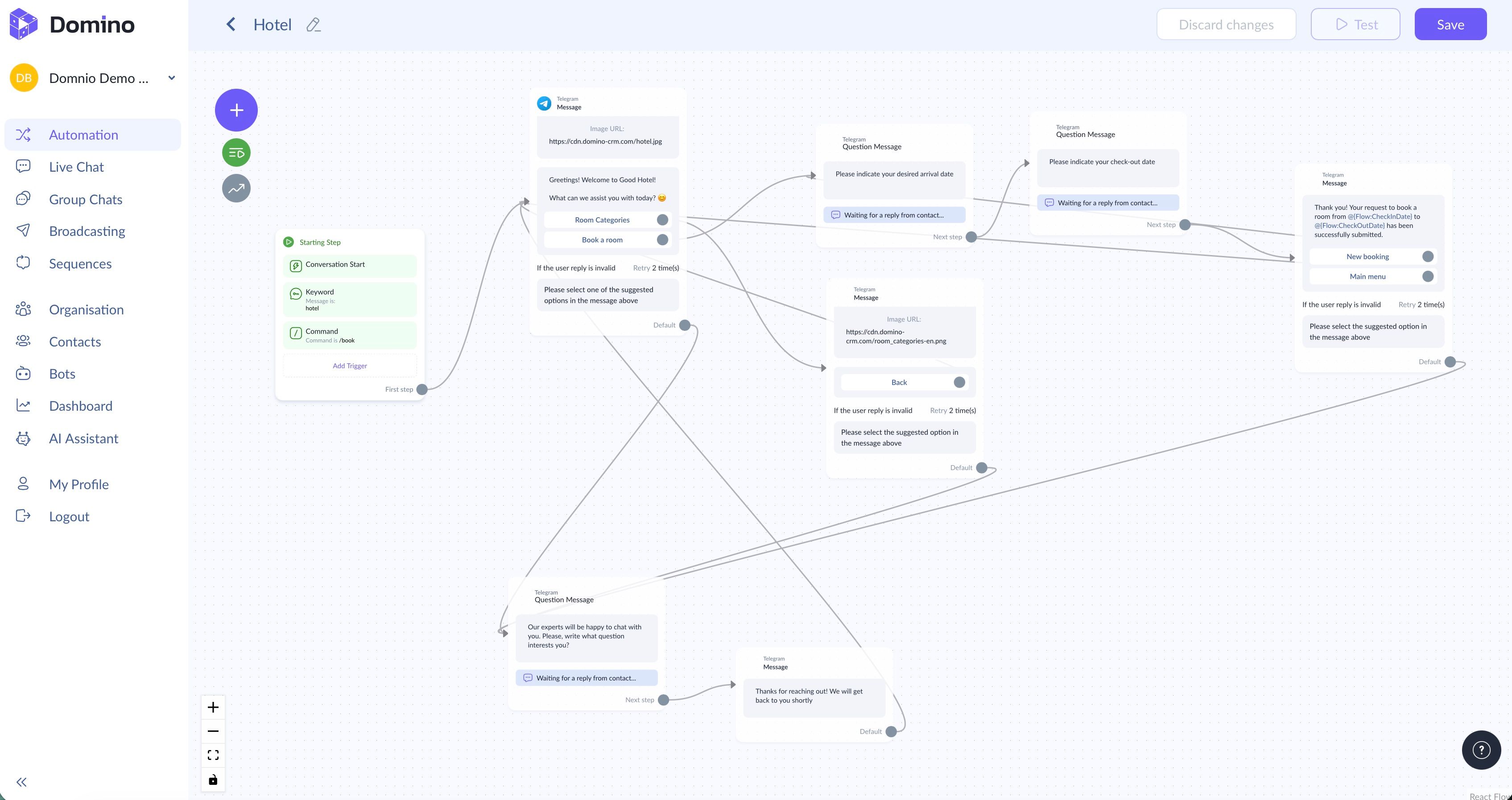
You can take this base and quickly expand it into a scenario of any complexity.
Give A Hotel Chatbot a Try
Compared to expensive mobile apps and booking aggregators with their service fees, a hotel chatbot is a practical and cost-effective option. Whether it becomes your main or an additional channel is entirely up to you.
P.S. By the way, if you rent out an apartment, room, or house to tourists for short stays, the Domino CRM chatbot builder can reliably cover the core needs of this type of business as well.
You May Also Like

Delivery Service Chatbot: How It Works with Domino CRM
Why delivery services need a chatbot and what tasks it handles in practice, from order intake and payments to delivery status updates.

How to Create a Chatbot for a Retail Store Without Coding
Chatbots for Retail Stores: Boost Sales and Simplify Shopping with Domino CRM