


February 17,2026
How to Run a Customer Survey via Chatbot: Domino CRM Guide
A customer survey in the hands of a competent marketer or manager is one of the most accurate tools a business has. Well-formulated questions help identify weak points and outline growth opportunities. However, running a customer survey today is not easy:
- Conducting surveys in person is only realistic for micro-businesses, and customers are unlikely to be enthusiastic: few people want to spend the time and effort (and the resulting ‘analog’ data still has to be transferred into digital form);
- People are increasingly less likely to answer calls from unknown numbers;
- Sending SMS and asking customers to reply is expensive and inconvenient for everyone involved;
- Sending emails carries the risk of spam. Also, they may be ignored or deleted without even being opened.
As a result, one the easiest way to run surveys today is through chatbots in messengers. This format offers:
- Automation and cost efficiency;
- Non-intrusive communication;
- Speed and convenience.
Domino CRM provides everything needed to conduct surveys via chatbots:
- Message and question nodes (users can respond using buttons or free text);
- Dialogue branching based on user responses;
- Pause nodes that allow you to trigger interactions at the right moment and extend the survey if needed;
- Rewarding users for completing the survey (for example, loyalty points);
- And much more.
All responses can be stored in variables. They are saved in the system and clearly linked to a specific customer.
For convenience, we even created a dedicated survey template: ‘Voice of Clients’.
Chatbot Surveys in Messengers: How to Set Them Up in Domino CRM
A chatbot customer survey is an automated way of collecting feedback in a messenger where users answer questions directly in the conversation. Building a flow for such a survey takes only minutes if you use Domino CRM. To start adapting the template to your business:
- Log in to the system and go to the 'Automation' section;
- Click '+ New Flow';
- Among the available templates, select 'Voice of Clients'.
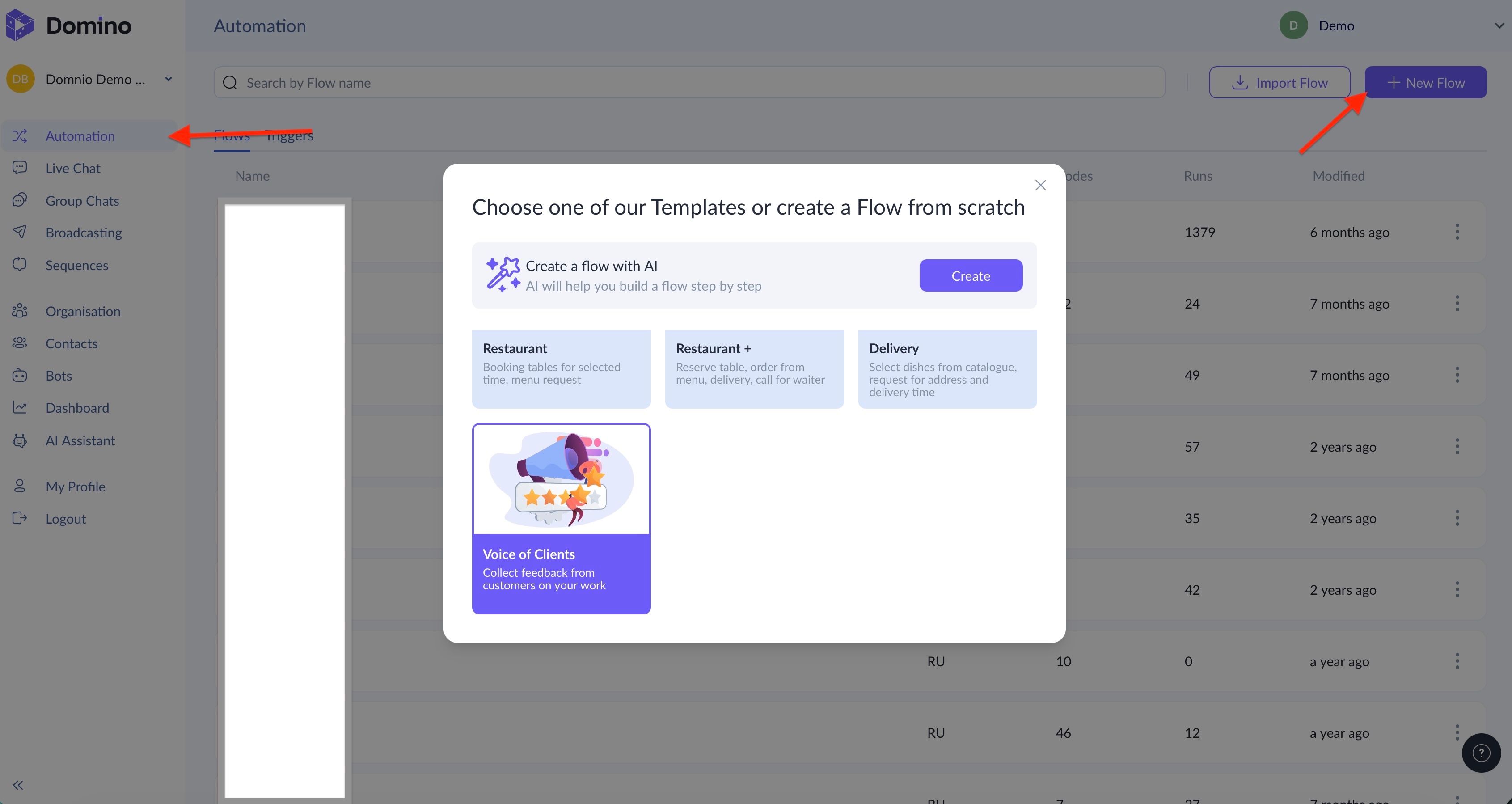
Now a few words about the template itself. Typically, surveys focus on two aspects:
- Evaluate what already exists;
- Evaluate what does not exist yet but could realistically be added.
Our template implements the first approach, but you can quickly adapt it to the second one.
Main Stages of Our Chatbot Survey Template
- An initial step with a set of triggers. To invite customers to the survey, we recommend adding a referral link to the flow that you can distribute via mass broadcasting. You can also start the survey using messages with buttons that carry a specific payload;
- A message inviting the user to take the survey;
- Two branches: for those who decline and those who agree;
- A three-second pause for those who agree;
- A message asking to rate the service with three buttons, i.e., from the lowest to the highest rating;
- If the user selects one or two stars, the bot asks whether a follow-up call is acceptable to clarify what went wrong;
- Transfer to a human operator (satisfied customers may also be routed to an operator if needed).
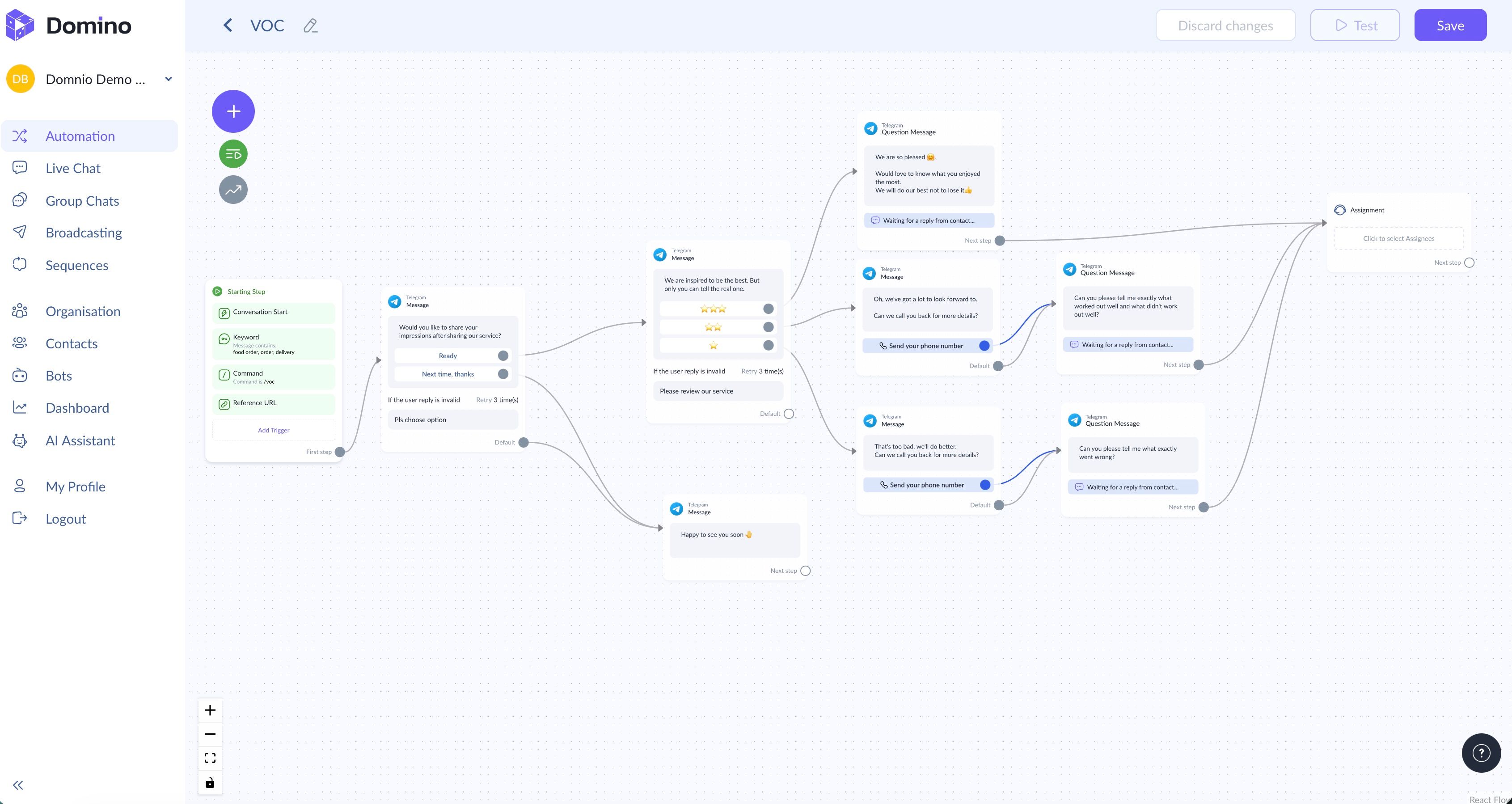
You can easily:
- Add more questions;
- Request clarifications in free text;
- Expand the rating scale (not three options but ten);
- Change the logic from “rate our service” to “what products would you like to see in our assortment?”;
- Grant points or discounts for completing the survey.
Understanding your audience is key to business success. Domino CRM makes it easy to gain that understanding. Try it in practice!
You May Also Like

How to Create a Restaurant or Café Chatbot Without Development
Ready-Made Restaurant & Café Chatbot With No Coding Required

Delivery Service Chatbot: How It Works with Domino CRM
Why delivery services need a chatbot and what tasks it handles in practice, from order intake and payments to delivery status updates.