


May 20,2026
Chatbot: How to Set Restrictions
Boundaries matter. Especially in business. It is not only about etiquette, although that plays a role too. It is also about reputational, financial, and legal risks that may arise from incorrect words or actions online.
Even with human employees and proper supervision, problems can still occur. But what if you also need to set limits for your own clients, subscribers, and group members so they do not create problems for you? In addition, if you use AI-powered chatbots to respond to user requests on VK and TG, it is also a good idea to keep them within certain boundaries.
So the question becomes: how do you define, implement, and maintain restrictions if your business uses chatbots? Domino CRM provides two options that can work together.
Restrictions When Using Chatbots
No business that uses a chatbot to communicate with customers one-on-one or act as a group administrator would want to leave it without restrictions.
On the one hand, the bot itself needs to be kept under control so it does not generate anything it wants.
On the other hand, the chatbot should also act as a reliable organizer and moderator in the channels it manages.
Domino CRM addresses both needs.
Restrictions for the Chatbot
Domino CRM users can set restrictions for their chatbots in two ways.
First, you can create a flow for the chatbot yourself and define in most nodes where, when, and what the bot will say.
Second, the flow can include an AI Assistant node, which can operate more autonomously. In this case, you have one key tool at your disposal: the prompt.
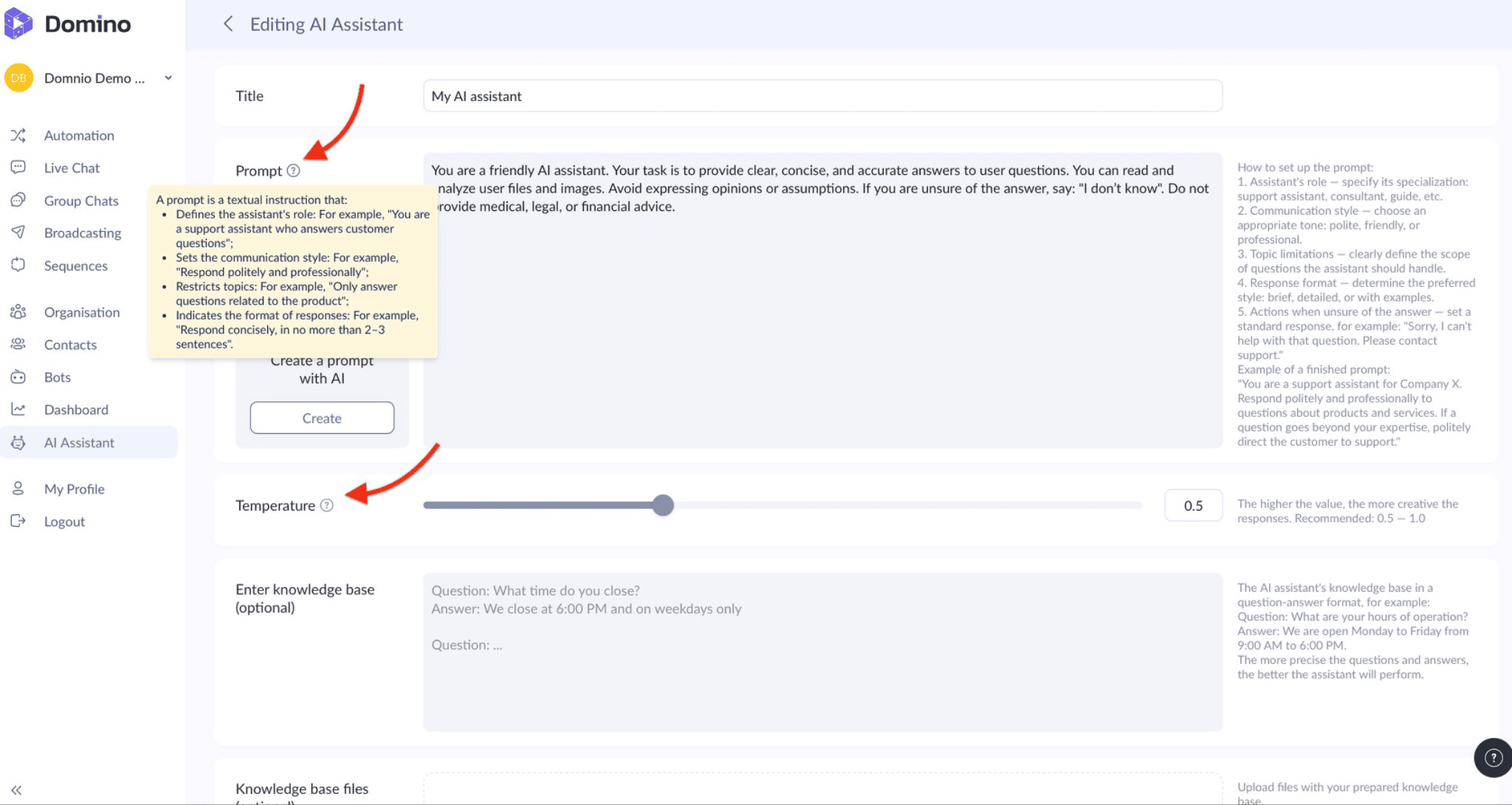
A prompt is a text instruction that defines how the chatbot should behave when communicating with users. Essentially, it establishes the rules the bot follows, including:
1. The chatbot’s role
2. Communication style
3. Topic limits
4. Response format
Restrictions can be defined within each of these parameters.
Another way to control the chatbot’s behavior is the Temperature parameter. This parameter determines how predictable or creative the AI’s responses will be. In simple terms, it regulates the balance between accuracy and flexibility in wording.
Restrictions Enforced by the Chatbot
At the same time, the chatbot itself can enforce restrictions when it comes to public communication in groups and channels. In the Group Chats section, you can configure two filters.
- Profanity Filter. A filter designed to detect and respond to inappropriate language in group chats. The chatbot automatically reacts to violations, for example, by issuing warnings or applying other penalties and restrictions. You can expand the built-in database with your own list of prohibited words and enable silent message deletion without posting a notice in the chat.
- Anti-Spam Filter. An AI-powered filter that helps combat advertising and unwanted topics in group chats. The chatbot analyzes text messages and reacts to violations — for example, by issuing warnings or applying other configured restrictions. You can define a list of prohibited topics, enable silent message deletion, and configure notifications about violations.
Conclusion
At both levels, Domino CRM provides more than enough functionality to control communication restrictions and help your business maintain a safe and well-moderated chat environment.
You May Also Like

Chatbot for a Website: How to Create One
How to Add a Chatbot to Your Website with Domino CRM

Automated VK Sequences: Domino CRM Tips and Best Practices
How to Set Up Automated VK Sequences in Domino CRM